AI writes the code. Your auditors get the proof.
Branch HQ builds and changes software with AI, and every change reaches your repository as a pull request that carries what checked it: the security scan, your tests, an independent review, the model, and who approved it. When a bank, insurer or hospital asks which of your code AI wrote, you hand them a report they can verify without us.
Mac with Apple silicon · Windows 10 or 11, 64-bit · Free for 14 days
Want us to review your app for you? See pricing and ask for a review →
Before you see it
audit record timestamped by timestamp.digicert.comAI specialists, each with one job
checks on every build before you see it
builds working end to end, on requests it had never seen
bytes of your code leave the building on a local model
Watch the work happen.
Every request goes to a team in a little pixel office on your screen. The lead calls a meeting, the builders' screens light up as they write, the reviewer checks the result, and the file passes from desk to desk. Hover anyone and they wave.
Point it at your repo. Review the pull request.
Most companies already have the code. Branch HQ works on it the way a careful new engineer would: reads first, changes only what was asked, runs your tests, gets a second opinion, and sends a pull request your team reviews like any other.
- ?Ask first, or changeAsk how something works and get a plain answer from the code; nothing changes. Ask for a change, or say what is broken, when you want something done.
- 1Every changed line, before anything movesYour folder is untouched until you approve, and files with your own unsaved work are never touched.
- 2Four checks, in the openStatic checks, your own tests in a separate copy, an independent review that judges whether it changed the right thing, and an audit record timestamped by an outside authority.
- 3See it running, before and afterOne click starts your project with the change applied, next to how it is now.
- 4A pull request with the proof in itOn GitHub, GitHub Enterprise or GitLab. The description lists what checked it, the commit carries the same facts, and your branch protection, reviewers and CI decide when it merges.
- 5Built for big repositoriesIt finds its way around thousands of files and reads large ones in the parts that matter. Tested on Outline, a real 2,822-file product: four of five requested changes correct, the fifth correct with extras a reviewer would trim.
- 6Your team's rules, kept in the repoCommit
.branchhq/policy.jsonand every change and undo goes through review. A named approver list decides who may approve at all. Undo is one click.
Make the maximum page size configurable
A real change Branch HQ made to Outline, with the record it kept. Outline's tests need its database, so they could not run on our machine, and the record says so instead of pretending.
Which of your code did AI write? Answer with evidence.
One click makes the AI provenance report for a whole repository. It reads what travels with the code itself, so it survives squash merges and needs nothing from the computer that made the changes.
- 1How much of the code, as it is nowEvery line is traced with git blame. A line a person rewrote later is theirs; a change that was undone counts for nothing.
- 2Every AI change, and what checked itThe model that wrote it, the security scan, the tests, the independent review and the named approver, change by change.
- 3Records that could not have been written afterwardsEach change's audit record comes with a Merkle proof to a log head signed by an outside RFC 3161 timestamp authority.
- 4Checked without us
node verify-provenance.mjs provenance.json your-reporecomputes every record, proof and line count, and checks the authority's signature with openssl. No Branch HQ, no account, no packages.
AI provenance: payments-service
Example output.
What your answers say, and what your code does. At the exact line.
A security check for any repository, built for the mistakes AI app builders ship with. Fixed rules, no AI model: the same code always gets the same result, and nothing is sent anywhere to produce it.
- 1The database left openSupabase tables without row-level security, rules that let anyone change every row, functions that run any SQL, Firebase rules open to everyone.
- 2Keys where they should not beThe Supabase admin key in the code, secret keys copied into the website through VITE_ or NEXT_PUBLIC_ settings, and keys left anywhere in the project's history.
- 3Visitor input reaching something dangerousSQL and NoSQL injection, XSS, commands and file paths built from what visitors send, in JavaScript, TypeScript, Python, Java, Go, Ruby, PHP and C#.
- 4Proof, not opinionsEvery finding comes with its file, line and code, with keys masked, and a Fix this button that hands it to the team as a reviewed change.
- →Facing a security review or a VAPT audit?We review your source code first and hand you every problem, with its fix, in 48 hours. Get your code reviewed · see an example
Measured on real code
From a demo app with planted mistakes; every key in it is fake. Each finding in the 94 apps was read by hand before it was counted.
Six specialists. One conversation.
You talk to Mitchell. He works out what's needed and hands each part to the specialist who owns it, so the website, the server and the paperwork are each built by someone doing only that.
Hover anyone: they wave back.
Mitchell
Reads the request, asks for anything important that's missing, and routes the work.
Jamie
The website people actually use: pages, forms, layout and the small moments of motion.
Dwayne
The server, the database and the rules: logins, bookings, and nothing saved that shouldn't be.
Penny
Reads every change like a senior engineer would and records a verdict. Never the model that wrote it.
Riley
Proposals, reports and spreadsheets as real PDF, Word, Excel and PowerPoint files.
Dana
Answers from the real record: what was built, what passed, what's still open.
One sentence is enough. It builds straight away from what you said. Anything only you can know is left as a visible placeholder to fill in later, instead of a guess.
Nothing is handed over on trust.
Most AI builders stop when the code looks right. Branch HQ keeps going until the app has been run and made to do its job. If a check fails, the specialist gets the real error and fixes it.
Security scan
- Hardcoded secrets and keys
- Plaintext passwords, unsafe cookies
- Routes that don't match between site and server
- Database changes that would break existing data
Independent review
- A second model reads every change
- Checks it does what was asked
- Records an explicit verdict
Started for real
- Dependencies installed, server booted
- Staff login checked with the real code
- A crash goes back to the builder with the log
Core action verified
- A real booking is made
- The app is asked to read it back
- Double-bookings refused
A site, a staff dashboard and a server that agree.
Ask for a connected suite and every piece shares one data model, and the checks run across all of them. A booking made on the public site shows up on the staff dashboard, and that is tested, not assumed.
Website
Customers browse and book. Confirmation emails go out on their own.
Server & database
One source of truth, real SQL storage, no double-bookings.
Dashboard
Behind a staff code. Owners change hours, prices and details themselves.
Software is never finished. Neither is the proof.
Sites change every few weeks and break quietly between changes. Branch HQ stays with the project: every later change is checked like the first build, and the live site keeps being checked, so the proof grows month after month.
From a description
Planned, built, security-scanned, reviewed, started and tested before you see it.
With a proof document
A Proof of delivery PDF for the client: every check it passed, verifiable by anyone.
Every change, proven
The saved project opens in Projects. Each change is tested, reviewed, previewed and undoable.
The live site, checked
Daily or weekly checks that it still works, recorded with an independent timestamp.
Hand your client evidence, not a promise.
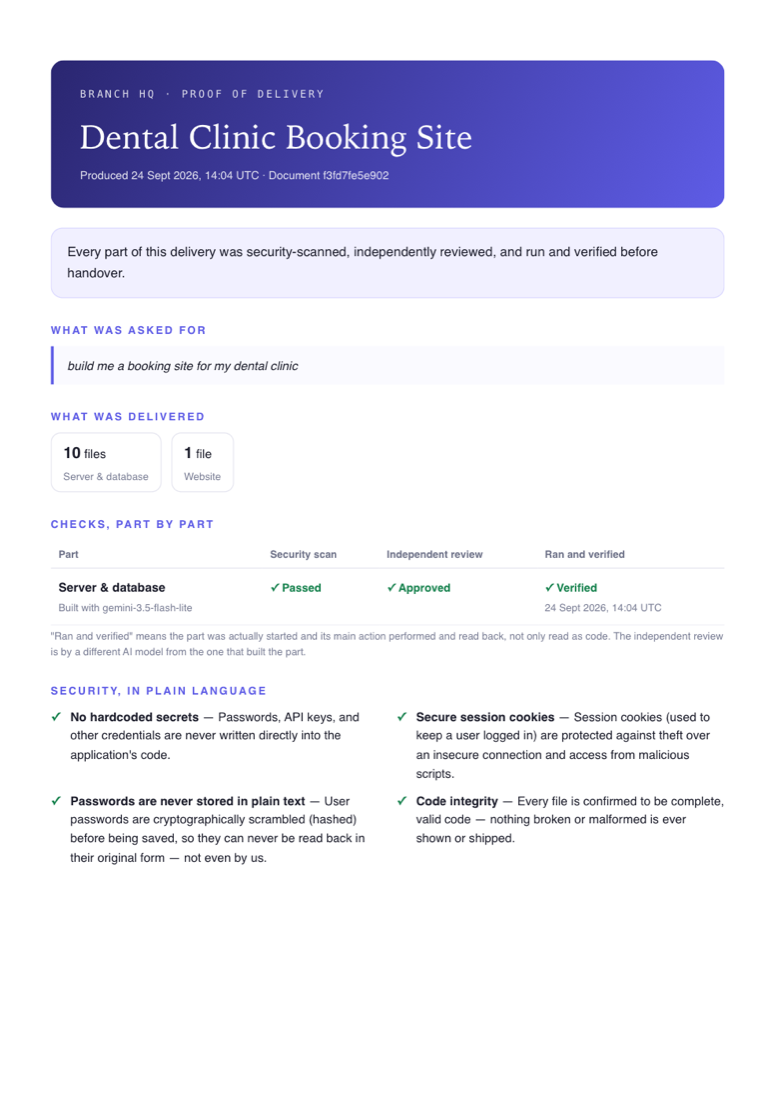
One click makes a Proof of delivery: what was asked for, what was built, each part's security scan, independent review and live test, the protections found in the code, and how anyone can verify the record themselves. It only ever states what the record shows — an unconfirmed part says so.
Every decision, chained and witnessed.
Every build, review and verdict is written to a hash-chained log. The newest link is signed by an independent timestamp authority, so rewriting history, even by whoever owns the machine, is provable to anyone with the token.
9c1e…a74f
40bd…17c2
e83a…9b0d
5f72…c611
5f72…c611
Protections that are enforced, not requested.
Asking an AI to "be secure" is not a guarantee. These are built into every server it makes, or checked on every change — code that fails them does not ship.
Built into every server
- Security headers on every response
- Cross-site access locked to the site's own address
- Error details hidden from visitors, kept in the server log
- Staff login checked on the server, never trusted from the browser
- Sensitive fields encrypted in the database
Blocked before it ships
- Keys or passwords written into the code
- Passwords stored without hashing
- Database queries a visitor could inject into
- Permissions the browser grants itself
- Keys hiding in git history, flagged when you open a project
Bring any model, or keep it in the building.
Choose per project, even per request. Point it at a model your company runs itself, and your code never leaves your network.
Gemini
The free tier is enough to start.
cloudClaude
Strongest on large, multi-file work.
cloudOpenAI
Familiar to most teams.
cloudAzure OpenAI
Your company's own Azure tenant, under your agreement.
your tenantAWS Bedrock
Claude, Llama and more, in your own AWS account.
your accountYour own server
Ollama and any OpenAI-compatible server. Found automatically.
local · privateWe test it the hard way.
27 of 32 builds working end to end, on eight requests it had never seen before, four builds each. A build only counts when the app is actually started and its main action saves real data that is read back.
builds working end to end in one batch, every one started and its main action saved and read back.
late September 2026across three batches running the in-build boot check.
late September 2026changes correct on Outline, a real 2,822-file product; the fifth correct with extras a reviewer would trim.
11 October 2026for the CI it writes into every project to go green on real GitHub Actions.
11 October 2026pull requests opened, listed and withdrawn on real GitHub; the auditor's checker verified a real DigiCert timestamp.
11 October 2026automated tests behind every release, many of them real repositories, real servers and real git.
every changeBuilt for the whole job.
A view for the client
Plain-English progress and results for the people paying, full technical detail one switch away.
Reports you can hand over
An audit report, an integrity check and a client summary, exported in one click.
Yours to keep
Save to a folder, download a ZIP, push to GitHub or deploy. Plain code, no lock-in.
Real emails
Booking confirmations sent through your own Resend account.
Keys stay encrypted
Stored with your operating system's encryption, never in a file in your project.
Always up to date
The app tells you when a new version is out. Updating keeps every chat, project and key.
Up and running in two minutes.
Free for 14 days, everything included. After that, sending changes as pull requests and saving provenance reports need a licence (write to hello@branchhq.online); everything else keeps working. Branch HQ isn't signed with a paid publisher certificate yet, so your computer asks you to confirm it once.
- 1
Open the download and drag Branch HQ into Applications.
- 2
Open it. When macOS says it can't verify the app, click Done, then go to System Settings → Privacy & Security and click Open Anyway. Only the first time.
- 3
Add a model in Settings: a free Gemini key from Google AI Studio, a Claude or OpenAI key, or your own model server. For the fastest previews, also install Node.js 22.5 or newer.
- 1
Run branch-hq-windows-setup.exe. If Windows shows Windows protected your PC, click More info, then Run anyway. It installs for your account and adds a desktop shortcut.
- 2
Add a model in Settings: a free Gemini key from Google AI Studio, a Claude or OpenAI key, or your own model server.
- 3
For the fastest previews and the Projects screen, install Node.js 22.5 or newer and Git for Windows.